
360 Degree Virtual Tour
Dewey Gottwald Center construction update at the Science Museum of Virginia
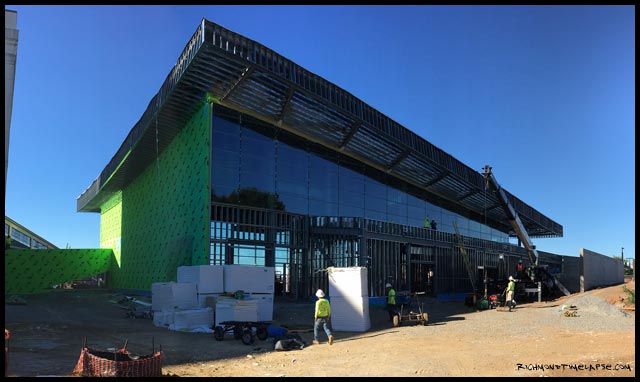
Take a quick look around at the progress inside and out as they work on the steel frame of the future Dewey Gottwald Center, a community event and exhibition facility at the Science Museum of Virginia. ——————————————— Location: www.smv.org Contractor: www.wmjordan.com Video: www.RichmondTimeLapse.com
Read MoreFarmville Barn Virtual Tour
Use the mouse to drag and move the panorama. Zoom in shift key and zoom out control key. If you don’t see the virtual tour loading, you need to upgrade below:
Read MoreFarmville Master Bath Virtual Tour
Use the mouse to drag and move the panorama. Zoom in shift key and zoom out control key. If you don’t see the virtual tour loading, you need to upgrade below:
Read MoreFarmville Master Bedroom Virtual Tour
Use the mouse to drag and move the panorama. Zoom in shift key and zoom out control key. If you don’t see the virtual tour loading, you need to upgrade below:
Read MoreFarmville Dining Room Virtual Tour
Use the mouse to drag and move the panorama. Zoom in shift key and zoom out control key. If you don’t see the virtual tour loading, you need to upgrade below:
Read MoreMotleys Auction & Realty Group Virtual Tour
Use the mouse to drag and move the panorama. Zoom in shift key and zoom out control key. If you don’t see the virtual tour loading, you need to upgrade below:
Read MoreKey West Pool Vitural Tour
Use the mouse to drag and move the panorama. Zoom in shift key and zoom out control key. If you don’t see the virtual tour loading, you need to upgrade below:
Read MoreTrigon Championship Virtual Tour
Use the mouse to drag and move the panorama. Zoom in shift key and zoom out control key. If you don’t see the virtual tour loading, you need to upgrade below:
Read MoreHabitat for Humanity Virtual Tour
Use the mouse to drag and move the panorama. Zoom in shift key and zoom out control key. If you don’t see the virtual tour loading, you need to upgrade below:
Read MoreDeck Virtual Tour by RBMremodels.com
Use the mouse to drag and move the panorama. Zoom in shift key and zoom out control key. If you don’t see the virtual tour loading, you need to upgrade below:
Read More